CRM Automation for Real Estate: What to Automate First
CRM Automation, Real Estate, Lead Management
CRM Automation for Real Estate: What to Actually Automate First
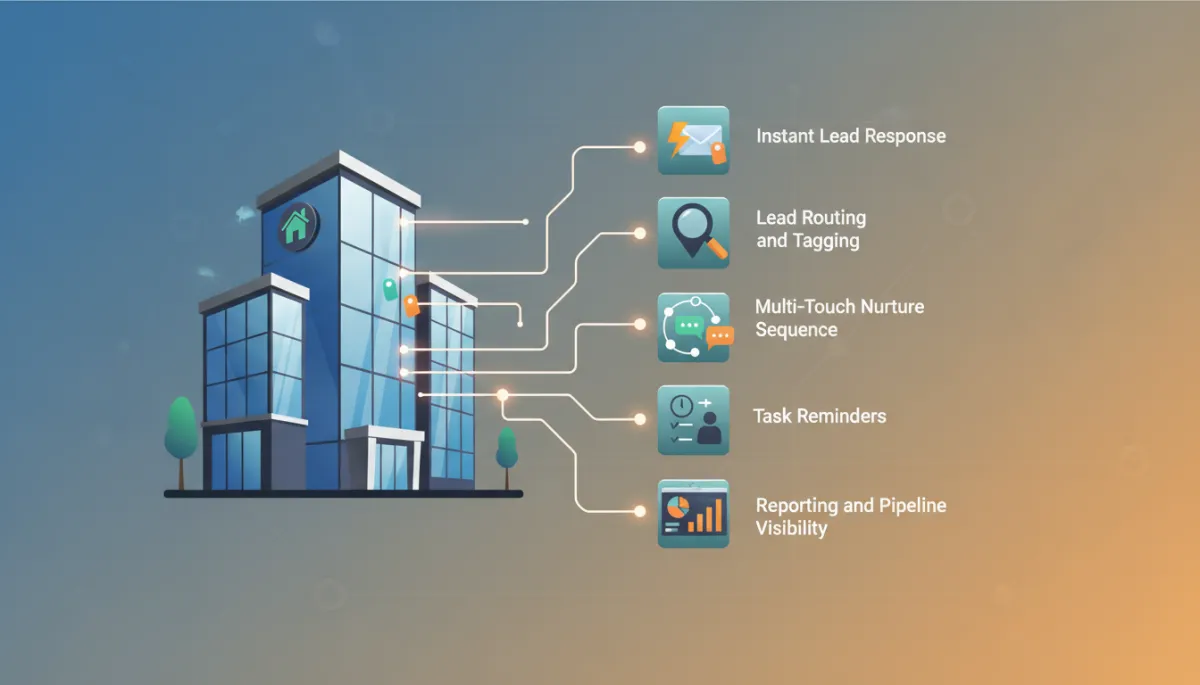
Most real estate businesses get CRM automation wrong in one of two ways: they have none at all, or they try to automate everything at once and end up with a tangle nobody trusts. The right approach is a specific, ordered build: start with instant lead response, the automation that catches leads at their most valuable moment, then add lead routing and tagging, then the multi-touch nurture sequence, then task reminders for the sales team, then reporting. Each stage should be working before the next is built. Automate in that order and the system compounds. Automate randomly and it collapses.
Here is the build order, and the honest answer to the robotic question.
A CRM License Is Not Automation
Plenty of developers and brokerages already pay for a CRM. Far fewer have automation actually running inside it.
The common state of a real estate CRM is a glorified spreadsheet: contacts in it, some notes, deals dragged between stages when someone remembers. Nothing happens on its own. No message fires when a lead arrives. No sequence runs when a lead goes quiet. No task appears when a deal stalls. The tool that could be doing the work is being used to store records of work not done.
The license was never the point. The value of a CRM is entirely in the workflows running behind it, and those have to be deliberately built. If your CRM has never sent a message or created a task without a human clicking, you do not have automation yet. You have an address book with a subscription fee.
The Build Order
This is a sequence, not a features list. Each stage depends on the one before it, and each should be tested and working before the next is added. Skipping ahead is how businesses end up with complex broken systems.
1. Instant Lead Response
Build this first, before anything else, because it has more leverage than everything else combined. The moment a lead arrives from any source, a form, an ad, a portal, the CRM fires an immediate text and email acknowledging the inquiry, referencing the specific property, and offering a next step such as booking a call.
This is the automation that catches leads at their most valuable moment, within minutes of raising their hand, at any hour, including the evenings and weekends when many inquiries arrive. No human team responds within five minutes around the clock. A workflow does, every time. If you build nothing else this quarter, build this.
2. Lead Routing and Tagging
Once every lead gets an instant response, make the follow-up relevant. As leads arrive, the CRM should automatically tag them by source, budget range, timeline, and property type, using what the form or ad captured, and route them to the right pipeline and the right person.
Tagging is what separates follow-up from spam later. The investor asking about yields and the family asking about school catchments should never receive the same sequence, and with routing in place they never will. This stage is boring, and it is the foundation of everything personalized that comes after.
3. The Multi-Touch Nurture Sequence
Now automate persistence. Each tagged lead enters a cadence appropriate to their segment: a structured mix of texts, emails, and scheduled call tasks spread over weeks, frequent early, spacing out over time, each touch carrying something useful for that segment.
This is the stage that fixes the oldest problem in real estate sales: most deals need many contacts, and most follow-up stops after one or two. With the sequence automated, no lead's future depends on a busy human remembering day 12. The machine remembers. Humans do the talking.
4. Task Reminders Tied to Lead Stage
Automation should support the human conversation, not replace it, and this stage makes that concrete. The CRM creates tasks for the agent or sales team based on where each lead sits: call this new qualified lead today, this viewing happened yesterday so follow up now, this deal has not moved in ten days.
The sales team stops working from memory and inbox archaeology and starts working from a list the system maintains. Nothing depends on anyone's discipline on a bad week, which is when deals are usually lost.
5. Reporting and Pipeline Visibility
Last, automate the truth. Dashboards and scheduled reports showing where every lead sits, how many are in each stage, which sources produce leads that progress, and which leads have gone quiet. This is what makes silent decay impossible: nothing sits cold for a month unnoticed, and decisions about spend and effort get made on numbers instead of impressions.
Reporting comes last not because it matters least, but because reports on top of a broken process just document the breakage in detail.
Will This Feel Robotic?
The honest answer: bad automation does, and it deserves the reputation. Generic messages blasted to an untagged list, sequences that keep sending after the person replied, tin-eared "just checking in" loops. That is automation built without the earlier stages.
Done properly, it is the opposite of robotic, for two reasons. First, because of tagging, every message references the person's actual situation: their project, budget, and timeline. Second, and this rule matters most, automation hands off to a human the moment the person replies. The sequence pauses, the agent gets a task, and a real conversation takes over. Automation covers the silence, humans handle the dialogue.
Compare that to the usual manual alternative: a fast reply if the inquiry lands at a good moment, then silence. A buyer who gets a relevant response in two minutes and a useful check-in in week three has been treated better than one waiting two days for a human to catch up. Speed and consistency are a form of respect.
The Common Mistakes
Four patterns cause most CRM automation failures. Building complexity before basics, elaborate branching workflows on top of a CRM that does not yet reliably respond to a new lead. Automating the wrong stage first, usually reporting or fancy pipelines before response and follow-up, which produces beautiful dashboards of leads going cold. Sequences that never hand off, running on autopilot past replies and turning warm leads hostile. And set-and-forget, automation nobody reviews, so nobody notices which messages convert and which quietly repel, and the system never improves.
All four have the same cure: build in order, keep it simple until each stage earns complexity, and review what the numbers say monthly.
How Sayt Digital Builds This
CRM automation is one of the four pillars of the buyer acquisition systems we build for developers and brokers, and we build it in exactly this order, because the order is the method. That includes the common starting point of a license already paid for with nothing running behind it: the platform is usually fine, and the build is what is missing.
If you want to know what your current setup would need, book a consultation with Sayt Digital and we will map your lead flow against these five stages and show you what to build first.
Frequently Asked Questions
I already have a CRM, why isn't it working?
Almost certainly because it stores contacts but runs no workflows: no instant response, no sequences, no automated tasks. A CRM without automation is an address book. The fix is not a new platform, it is building the five stages in order, starting with instant lead response.
Will automation make my follow-up feel impersonal?
Not if it is built on tagging and a strict human handoff rule. Messages that reference the person's specific project, budget, and timeline, and a sequence that pauses the moment they reply so a human takes over, feel more attentive than slow manual follow-up, not less. Impersonal automation is a symptom of skipping the routing stage.
What should I automate first if I can only do one thing?
Instant lead response: an immediate text and email the moment any lead arrives, referencing the specific property and offering a next step. It has the highest leverage of any automation because it acts in the minutes when a lead is most convertible and covers the hours when nobody is at a desk.
Can automation replace my sales team?
No, and it should not try. Automation handles speed, persistence, and memory: instant responses, scheduled touches, task creation, tracking. Humans handle conversations, viewings, negotiation, and closing. The system exists to make sure every lead reaches a human conversation, not to substitute for one.
How long does CRM automation take to set up?
Built in the right order, the first stage can be live within days, and a complete five-stage build typically takes a few weeks including testing. The timeline depends less on software and more on the underlying decisions: segments, sequences, handoff rules. Rushing all five stages at once usually costs more time than it saves.